Reading with RSVP & setting the speed
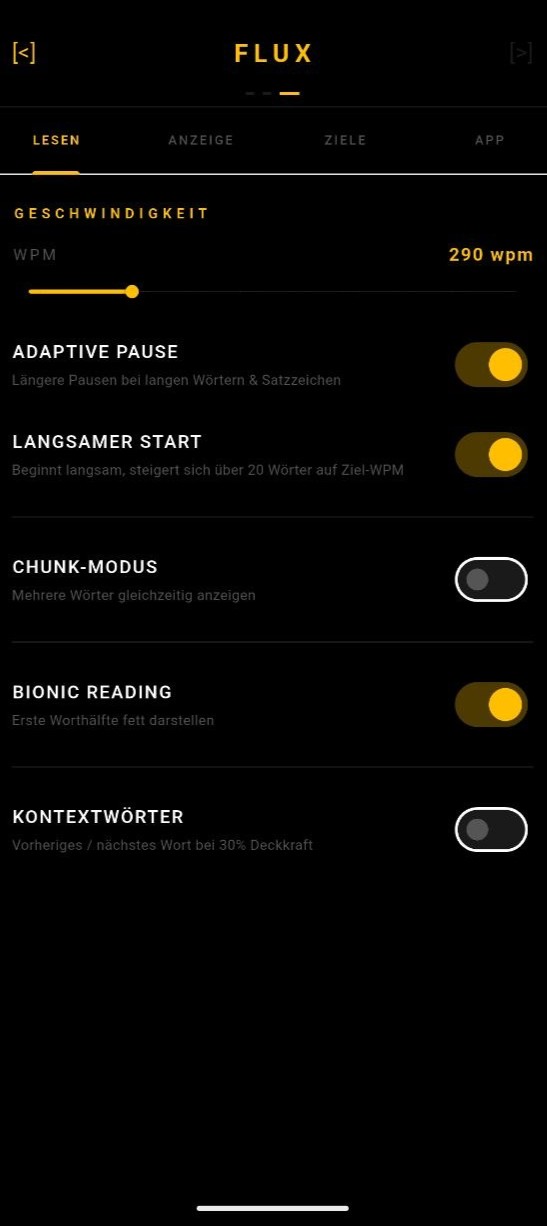
In RSVP reading (Rapid Serial Visual Presentation) FLUX shows words one by one in the same spot so your eyes no longer have to jump. The base pace comes from words per minute (WPM): 60000 / WPM milliseconds per word. Several options smooth the flow.
Trigger Tap a book → the full text opens → tapping a word starts the RSVP reader from there. Or "READ" at the bottom.
Requirements
- An imported book in the library.
- Nothing else – RSVP works offline.
Step by step
- Open the book, scroll the full text to where you want and tap a word (or "READ" at the bottom).
- The reader starts with a short "decrypt" animation on the first word. Tap to pause and resume.
- Change speed: swipe up/down in the reader – each swipe is ±5 WPM, the value flashes briefly. Range 100–1000 WPM.
- Navigate: swipe left/right to jump one sentence back/forward. The pause overlay also has sentence chips.
- Fine-tune under Settings → READING: "Adaptive Pause" (long words ×1.4, +350 ms after . ! ? …, +150 ms after , ; : —), "Slow Start" (first 20 words slower), "Chunk Mode" 2–4 words at once, "Context Words" (dim neighbouring words).
- At the end of the book the "[ EOF ]" overlay shows session stats (words, time, avg WPM, streak).
If it doesn't work
- Too tiring: lower the WPM, keep "Slow Start" and "Adaptive Pause" on, try Chunk Mode 2 instead of single words.
- Progress doesn’t move: it is saved when you pause and leave – pause briefly, then go back.
- Swipe gestures don’t respond in landscape: there the controls live in the side rails (back arrow, WPM, play/stop).
- Screen dims: FLUX keeps the screen awake; battery saver mode can override that.
Last updated: 5 September 2026
Was this helpful?