Chaos Counter
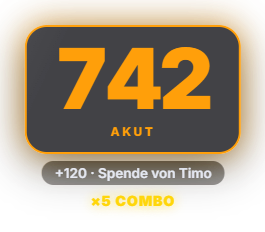
Shows a large number in the overlay that counts up on stream events — chat messages and commands, TTS playback, follows, subs, gift subs, donations, bits and raids. For non-chat events it briefly shows why it went up (e.g. "+120 · Donation from Timo"). When several events happen in quick succession, the effect intensifies in stages (shake, glow, combo counter). Four configurable chaos levels (Calm → It's starting → Intense → FULL CHAOS) with their own names, thresholds and colors; hysteresis prevents flickering at the edge. Visibility can be always-on or only from a certain level, with automatic hiding after a quiet period. The level continuously decays when nothing happens, and resets to 0 on every program start (not persisted). For automations there are dedicated triggers "Chaos level changed", "Chaos combo reached" and "Chaos subsided". A new session high score triggers its own special effect. New in 1.0.15: "Chaos +10" and "Reset chaos" as keys for Stream Deck and the phone remote.
Trigger Automatically on chat messages/commands, TTS, follows, subs, gift subs, donations, bits and raids.
Requirements
- Premium – or the free 14-day Premium trial (see “Premium trial”).
Step by step
- In the module tab, set point values per event type, decay speed and the combo window.
- Name the four chaos levels and set their thresholds/colors.
- Choose a visibility mode: always visible or only shown from a certain level.
- Set the position via the Positions tab, and the appearance via color presets (free) or a custom HTML/CSS design via AI (premium).
Last updated: 4 November 2026