Donation pot
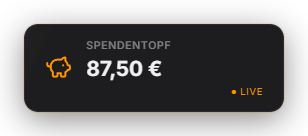
Displays a running total as a filling vessel — great for challenges. By default the jar fills automatically with every real donation (StreamElements, Ko-fi, YouTube Super Chat/Sticker), but it can be switched to purely manual filling in the Donation Jar tab. You can also add manual amounts at any time: via the input field in the tab, a Quick Control action, or `POST /api/donation-pot/add`. Individual entries can be deleted again; "Archive" closes out a round (total + entries move into history) and resets the jar to 0. A permanent display mode keeps the jar in the overlay at all times. There is no target amount and no 100% event. Since 1.0.15 the permanent display is visible right after a restart; archiving and deleting an entry correct the total immediately. The deposit sound follows the sound library's master volume and can be replaced or muted there via "Donation pot: deposit". Since 1.0.27 the counter and corrections tween instead of jumping, and the “+amount” pill flies into the total. New in 1.0.28: Entries can be deleted with an undo option, auto-hide waits for the counter animation, and the history stays lean even after long use.
Trigger Automatically on every real donation (can be disabled), plus manually — amount in the tab, via Quick Control, or via the API.
Last updated: 15 November 2026