Mascot (Zappi)
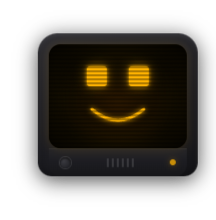
The mascot module (free, off by default) shows a permanently visible character in the overlay that reacts to mood, speech and alert signals. The „Zappi" preset is the familiar CRT TV with eyes, mouth and alert panels. Alternatively you build a completely custom mascot with AI (it need not be a TV — robot, ghost, animal …): copy the prompt, have ChatGPT or Claude design it, and import it via the clipboard. The AI design runs isolated as its own mini-overlay with a live preview and sliders for color, size and glow. In „Alert routing" you set per alert type where it shows: for follows, like counter, chat bot and social media you choose between „Mascot" (mascot screen only), „Both" (mascot panel AND the module's own card) and „Off" (own card only); TTS and donations/subs stay a simple on/off switch. Optionally, the mascot shows a brief thank-you reaction on donations and subs. New in 1.0.19: Zappi (preset and AI design) can be moved, scaled and placed differently per OBS scene in the Positions tab like any other module. The corner/margin setting in the mascot tab remains the starting position. While speaking, the mouth follows the voice and closes during pauses.
Trigger Mascot tab (under „Design"), enable the module. Position, size and margin are adjustable.
Requirements
- For a custom AI mascot: an AI chat (ChatGPT, Claude or similar) to design the copied prompt.
Step by step
- Open the mascot tab and enable the module — the Zappi preview appears.
- Set the screen corner, size and margin.
- Under „Alert routing" choose per alert type: „Mascot", „Both" or „Off" (follows/likes/chat bot/social media), or on/off (TTS, donations/subs).
- For a custom design: copy the prompt, have an AI build a mascot, import the result via the clipboard and name it.
- Fine-tune color, size and glow with the sliders in the tab; the live preview updates immediately.
If it doesn't work
- Want the mascot to answer in chat? That is what Zappi AI (Premium) does – see the page “Zappi AI (@zappi)”.
- An imported AI design shows nothing: the copied content was incomplete — copy the full prompt again and have it redesigned.
- Alerts still appear as their own card: routing for that alert type is on „Off", or on „Both" (which keeps the card by design) — set it to „Mascot" to show only the mascot.
Last updated: 28 October 2026