Zappi AI (@zappi)
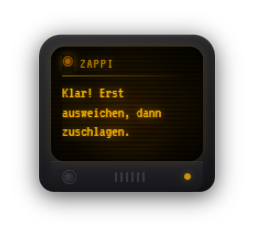
Zappi AI (Premium, off by default) turns your mascot into someone to talk to: when a viewer types “@zappi” plus a question in chat, the question is shown briefly, the mascot “thinks” and answers in one or two sentences – as text inside the mascot and via text-to-speech. This works with the “Zappi” preset as well as with your own AI design. The answers come from an AI provider you choose yourself (Google Gemini or Anthropic) using your own API key; the Google key is free and enough for normal streams. You set the name, trigger word, answer language and personality: four ready-made characters (cheeky, friendly, dry, nerd) or your own description. To keep unsuitable content out of the stream, safeguards are always active: questions are cut to 200 characters, messages containing links or words from your word filter are dropped, the answer is filtered as well before it is shown, and limits (pause per viewer, pause between two answers, optionally a daily limit) protect against spam. Without an API key the mascot simply stays silent on stream.
Trigger Mascot tab → switch on the “Zappi AI (@zappi)” section. Viewers trigger it with the trigger word in chat (default: @zappi).
Requirements
- Zappify Premium.
- The mascot module is switched on (the answer appears inside the mascot).
- Your own API key: free from Google (aistudio.google.com/apikey) or paid from Anthropic.
- You tell your viewers (for example in the channel description) that messages to the mascot are processed by an AI.
Step by step
- Sign in at aistudio.google.com/apikey with a Google account and create an API key.
- In Zappify: Mascot tab → “Zappi AI (@zappi)” → “Set up AI provider”. Paste the key, save and press “Test connection”. You can leave the model field empty.
- Back in the Mascot tab, switch Zappi AI on and confirm the privacy notice.
- Try it with “Test question” – the answer appears in the overlay and is read aloud.
- Adjust personality, name, answer language and limits to taste.
- Optionally set who may ask (everyone, subscribers, VIPs, mods) in the “Commands” tab under the @zappi entry.
If it doesn't work
- Zappi does not react at all: the startup check on the home screen shows what is missing in the “Zappi AI” row (API key, privacy notice or a switched-off mascot).
- Zappi does not answer some viewers: the pause per viewer or the pause between two answers has not passed yet, or the message contained a link or a word from your word filter.
- The answer is shown but not read aloud: text-to-speech is not set up. Choose a provider under Other settings → Text-to-speech; Piper runs locally without an account.
- Question and answer sound the same: Piper has a single voice. Switch off “Read the viewer's question aloud” or use a cloud provider with several voices.
- “Test connection” reports an error: check the key and clear the model field – the current default model is then used.
Last updated: 7 October 2026