Automation: if-then rules
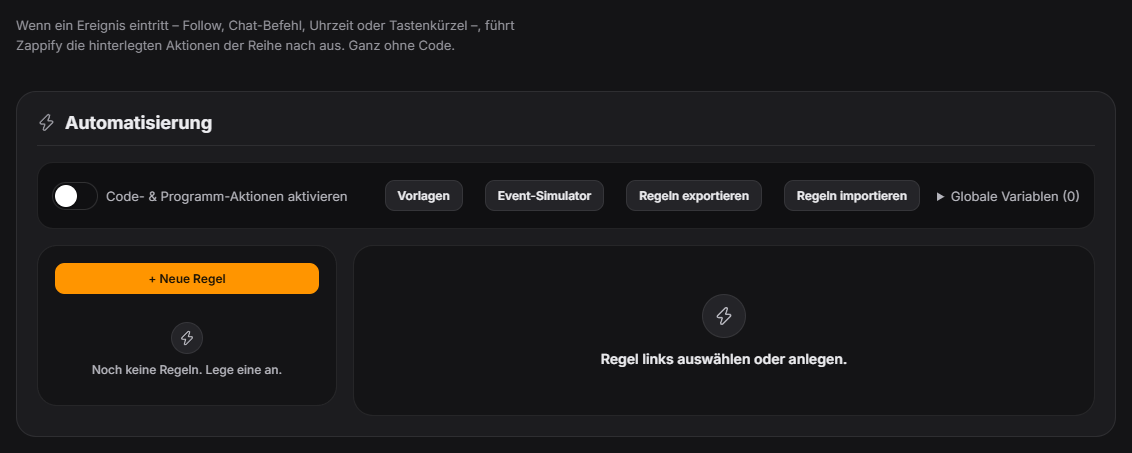
In the „Automation" tab (lightning icon) you create rules. Each rule has one trigger and a sortable list of actions with indentable blocks. Triggers are platform events (follow, sub, resub, gift sub, raid, bits, donation, first message, stream start/end, like counter), chat commands with a permission level, schedules (cron or presets, optionally only during the stream), a manual button (also via an HTTP route for the Stream Deck) or a global hotkey. Actions include wait, if/else, repeat, set variable, log note, sound, TTS, OBS filter and scene, chat message, award points, module action (start poll/quiz/wheel …), random branch, wait for event, module on/off and HTTP request (with SSRF protection). Variables exist transiently per run, stored per rule and globally across rules; placeholders like {{user.name}} and expressions {{= global.counter + 1 }} work in every text field. Per rule you can use conditions, a cooldown (per rule or per user), a dry run and an execution log. Rules can be exported and imported as JSON (imported rules arrive disabled). A further action is "Discord webhook" (POST with text/embed to a Discord webhook URL), plus a "Level up" trigger with {{level}}/{{oldLevel}} context. New in 1.0.12: the trigger "Channel point reward redeemed (Twitch)" with the condition fields "Reward name" and "Reward cost" and the placeholders {{rewardTitle}}, {{rewardCost}}, {{rewardPrompt}} and {{message}} (text entered by the viewer), plus the ready-made template "Channel point reward". The "Stream start" and "Stream end" triggers now come straight from Twitch, and the "only while live" option for schedules also works when Zappify is started in the middle of a stream. More new triggers: "Hype Train started / level completed / ended", "Goal bar: goal reached" and "Anniversary / milestone reached"; new module actions for Hype Train, goal bar and giveaway. New in 1.0.13: the "Raid" trigger fires on its own for incoming Twitch raids ({{user.name}}, {{raidViewers}}), plus the action "Send Twitch shoutout" (empty channel = triggering user, optional chat message). New in 1.0.14: rules can show and hide OBS sources (including "show briefly" for a few seconds, in a specific or the current scene), mute or unmute audio sources or set their volume, and restart, pause or stop media sources; "Toggle" on the OBS filter action now really toggles the filter. New triggers: "OBS scene changed" (with {{sceneName}} and {{previousScene}}) and the state triggers "Viewer count reaches X" (or drops below X), "Variable reaches X" and "Chat has been quiet for N minutes" – they fire exactly once when the state is reached and only again after it has been left in between. The new action "Show text/image" displays a text and/or your own image in the overlay without any module: position (nine anchor points plus offset), width, font size, duration and look (one of the five designs or the global design) are set right in the action, placeholders work. Several overlays can be shown at once; with a name you can replace one specifically or remove it via "Hide overlay". Stream start and stream end are now detected on YouTube as well – if you stream to both platforms, filter with the "Platform" condition. There are further triggers and actions for the Scare Meter ("Scare detected" with {{scareCount}} and {{scareIntensity}}) and for Stream Plays (switch controller). New in 1.0.15: actions for the timer (start, pause, stop stopwatch and countdown), music (change mood, pause/resume, next song), stream info presets, like counter, end screen, clip markers, donation pot, anniversaries, social media (show a specific channel), leaderboard and fanart; polls start directly from a saved template. New triggers: "Countdown finished", "Song changed", "Random wheel: result decided", "Counter: value changed" and "Tech warning" (fields warning type, duration, measured value). With the new condition "Gifted sub" the individual subs of a gift bomb can be excluded from the "Sub" trigger. The "End quiz" action works again. New in 1.0.16: actions and triggers for Draw & Guess (start/hit/end), Chat Pointer (“result is in” with cell and percent) and the No-Laugh Challenge (start, laugh detected, HP lost, laughed, survived). New in 1.0.17: trigger “Moderation: message deleted / user banned” ({{moderationScope}}, {{moderationReason}}), action “Notice just for me” (private notice, not on stream), actions “Timer: adjust time” and OCR “Select area” / “Read last area”. Several rules with the same !command now all fire; copied rules start disabled, and the tab warns about duplicate commands. New in 1.0.22: "Emergency stop" action – triggers the same emergency stop as the red button in Quick Control. Since 1.0.24: conditions list the fields matching the trigger first, then “All fields” and “Custom field …” (free-text path); new operator “is one of” (comma or | separated list). “Award points” can abort when the user has too few points (with an optional chat notice). A rule’s cooldown is only used up when its conditions were met. “HTTP request” checks the real target address and every redirect – redirects into your home network are blocked. Since 1.0.25: New action “OBS output” starts, stops or toggles recording, streaming, the replay buffer and the virtual camera (marked as a dangerous action). New triggers “OBS: recording started” and “OBS: recording stopped” – on stop, the recording’s file path is available as a field. New in 1.0.28: Many new triggers from the modules – bingo round started/ended/winner, like milestone, meme shown, music (mood, playlist end, pause/resume), no-laugh cancelled, points awarded, scare record, Stream Plays (input, pause/resume), level-up, TTS spoken/rejected, plus result triggers for poll/prediction, quiz, giveaway, points wheel, Screen Picker, infection game and Pictionary. New actions: show meme, create replay, sticker without cost, timed commentator, resolve/cancel prediction, clear bubbles and spin Random Game.
Trigger The „Automation" tab in the control panel. Rules hang off the same event pipeline that feeds every other module with Twitch/YouTube events.
Step by step
- Create a new rule, name it and assign it to a group.
- Pick a trigger and — if needed — add conditions and a cooldown.
- Add actions and sort them by drag and drop; containers like if/else, repeat or random branch hold further actions.
- Check with „Dry run" (log only) or „Real test" (fake event), then enable the rule.
- Alternatively insert a ready-made template from the top of the tab (thank a follower, greet a raid, hype counter …) — templates always arrive disabled, review and adjust first.
- To try things out without a real event, use the "Event simulator" at the top of the tab: fire a follow, sub, gifted subs, raid, donation, bits or channel points with any name and amount. The test event runs through the whole chain (sounds, alerts, bubbles, your own rules); points, statistics, donation history, end screen, goal bar, donation goal and Hype Train stay untouched.
If it doesn't work
- The „Run code" and „Launch program" actions are off by default. They run locally with full permissions and only for your own rules — never for imported ones — and must be unlocked via the risk switch in the tab first.
- A rule fires twice or not at all: check the cooldown and cooldown scope (per rule / per user); multiple triggers of the same rule run one after another.
- Events produced by automation do not trigger further rules (protection against infinite loops).
- The channel point trigger does not fire: Twitch needs an additional permission for it — disconnect and reconnect Twitch once under "Connections". Channel points are only available for affiliate and partner channels.
- The event simulator sends a real chat message: actions of your own rules are really executed for test events too. Use the condition "Is test event" to exclude individual rules.
- A rule with "Viewer count updated" never used to fire: fixed in 1.0.14 – the trigger now fires on every new viewer count. For "exactly once at X viewers" use the new trigger "Viewer count reaches X" instead.
- "Show text/image" shows no image: images must be a file on your PC (no web address). The word filter also applies to the displayed text.
- The shoutout is not sent: Twitch only allows shoutouts while your own channel is live, at most one every 2 minutes and the same channel at most every 60 minutes. Twitch also needs an additional permission for it – disconnect and reconnect Twitch once.
Last updated: 15 November 2026