Stream Plays (Twitch Plays)
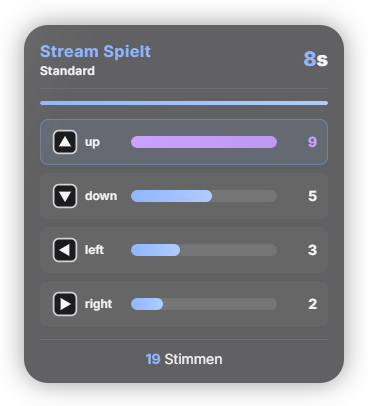
Viewers type the shortcut of a controller button into chat; after each round the key with the most votes is pressed – or in anarchy mode every input immediately. In the "Stream Plays" tab you create as many controllers of your own as you like: per button its own image (PNG/JPG/WebP by click or drag & drop), a label, the chat shortcut and the key (just press the key you want). Exactly one controller is active; you can switch in the tab, in Quick Control, via Stream Deck / phone remote and via automation. The templates "Standard" (D-pad, A/B/X/Y, L/R, Start/Select) and "GameCube" are included. The overlay shows the name of the active controller, the running vote and a "Paused" indicator. Safety: keys only go to the window you set as the target window – if you switch to another program, Stream Plays pauses automatically and releases all keys. The Windows key and system shortcuts (Alt+F4, Alt+Tab, Ctrl+Alt+Del, Ctrl+W …) cannot be assigned. An emergency stop halts everything immediately. Look: 8 colour presets including the 5 cross-module styles, "Follow global design", fine-tuning and AI colour design. Privacy: votes only live in memory, nothing is stored or transmitted.
Trigger Viewers type a button's shortcut into chat – either just the shortcut ("a") or with an exclamation mark ("!a"). Start and pause in the tab, in Quick Control, via Stream Deck / phone remote or via automation.
Requirements
- Premium – or the free 14-day Premium trial (see “Premium trial”).
- Windows and a game that runs in its own window and accepts simulated keys.
- Only for games you legally own and are allowed to show.
Step by step
- In the "Stream Plays" tab switch the module on and confirm the one-time safety notice.
- Choose a controller (template "Standard" or "GameCube") or create your own: set image, label, chat shortcut and key per button.
- Set the target window – the game window the keys are allowed to go to.
- Choose the mode: vote per round or anarchy (every input immediately).
- In the Commands tab, use the entry "Stream Plays: vote" to set who may play (everyone, subscribers, VIPs, mods) or switch voting off.
- Start. The emergency stop is on Ctrl+Shift+F10, plus a button in the tab, in Quick Control and on the Stream Deck.
If it doesn't work
- The game does not react to the keys: games with anti-cheat protection and some fullscreen games do not accept simulated keys. Start the game in windowed or borderless mode and check that the right target window is selected.
- Stream Plays shows "Paused": the target window is not in the foreground. Switch back to the game – Stream Plays then continues.
- A key cannot be assigned: the Windows key and system shortcuts (Alt+F4, Alt+Tab, Ctrl+Alt+Del, Ctrl+W …) are blocked on purpose.
- Chat messages like "a" trigger by accident: switch to the notation with an exclamation mark ("!a").
- Stop everything immediately: emergency stop (Ctrl+Shift+F10) – the kill switch triggers it too and releases all keys.
Last updated: 9 October 2026