Points award overlay
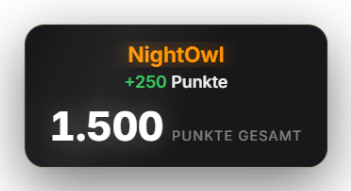
When you right-click a viewer in the Quick Control chat and give them points, this overlay plays an animation with the real Twitch/YouTube profile picture and a counting-up score. The color of the name, the gain ("+X") and the total point count, as well as the card look, are configurable under Other Settings → PointsAward → Appearance.
Trigger Right-click a message in Quick Control → award points.
Step by step
- Make sure the overlay window is captured in OBS via a Window Capture (see "Setting up OBS") — the animation appears in it automatically.
- In Quick Control chat list right-click target user -> "Award points".
- Overlay immediately plays mascot animation with user profile picture.
Last updated: 19 September 2026
Was this helpful?