Commentator mode
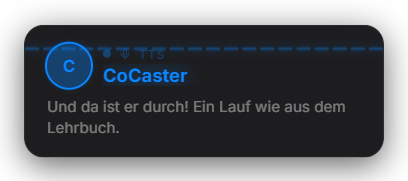
You appoint one or more viewers as commentators; from then on the app reads every chat message they send aloud, without them typing !tts. It uses the same TTS pipeline as the Text-to-speech module (provider, voices, bad-word / URL filters). A profile picture or Wolpertinger is shown next to the message. Free module.
Trigger Automatic on every chat message from a listed commentator.
Requirements
- The Text-to-speech module is active and a provider is set up (see „Text-to-speech") — nothing happens without active TTS.
- Twitch and/or YouTube connected.
Step by step
- Open the Commentator tab and enter the usernames you want (chip list). Or right-click a user in the Quick Control live chat → „Enable commentator".
- Choose the image source: Automatic (the viewer's per-user setting), always Wolpertinger, or always profile picture.
- Set filters: skip commands (!…), skip links, min/max length, optional per-user cooldown against chat floods.
- Done — the commentators' messages are now read aloud automatically.
If it doesn't work
- Nothing is read aloud: the TTS module is disabled or no provider/key is set — the specific warning is in the Home log window.
- A commentator isn't recognized: the entered name must match the Twitch login or YouTube display name (case-insensitive).
- Too much talking: raise the per-user cooldown or lower the max length (longer messages are read truncated).
Last updated: 6 September 2026
Was this helpful?