Polls, open questions & bets
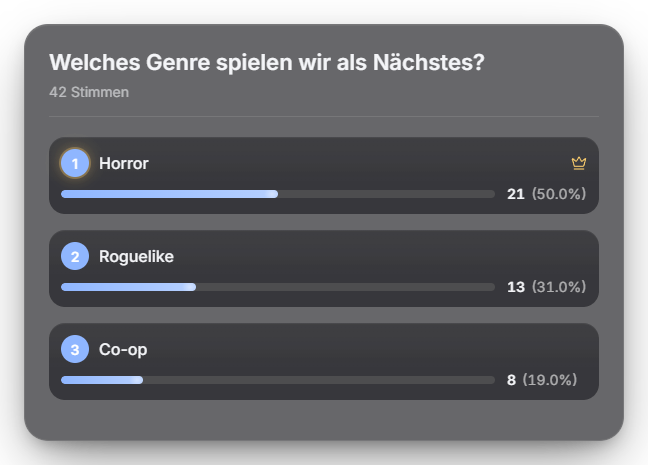
Three modes: classic poll (`!umfrage Question? # Option A # Option B`), open question (`!openpoll Question?`) and bet (`!wette Option A # Option B`). In every mode viewers vote with a bare digit (1, 2, 3 …) — there is no `!bet` command. For a bet the stake is fixed (default 10 points), deducted on the first pick, and re-picking is free. After it ends the streamer chooses the winning option; the collected pool is split equally among correct pickers (if nobody was right, the pool is forfeited). The poll/bet result can additionally be announced via TTS (its own toggle in settings): a short signal sound plays, then the global TTS voice reads out the result — without showing a character. New in 1.0.15: an "Automatic duration" ends polls, open polls and bet entry on its own (with the usual 5-second countdown); 0 = manual as before. Bets no longer lose stakes: "Cancel bet + refund" in the Polls tab and in Quick Control returns all stakes, as does turning the module off, quitting Zappify or – after a crash – the next start. Polls can be started directly from a saved template via automation, Stream Deck and the phone remote. New in 1.0.19: Reworked overlay: options keep their place while voting, the leader gets a crown, “Close race” when it is tight, a time bar, and an animated result with a banner for the winner, a tie or “No votes”. Voting also works with “!vote 2” or “#2”. In the tab: remaining time and “+30 s” (also Quick Control, remote, Stream Deck, automation), reorder options via drag & drop. Voting rights: the streamer, known bots and hidden users do not vote by default. Twitch mirror (Settings → “Twitch polls & predictions”): additionally starts a real Twitch poll, or a Twitch prediction with channel points for bets; YouTube keeps voting in chat and the overlay shows the total. Channel points and Zappify points stay separate. New in 1.0.21 – Council of elders: in the poll settings you decide who may vote (everyone, only subs/channel members, only regulars from X attended streams, or from level X) and whether votes count more by level or stream visits (capped, default at most ×5). The overlay then shows a “Council of elders” badge and the voters’ profile pictures under each option. Applies to normal polls only. New in 1.0.22: "Set winner" and "Cancel bet" need a second click within 3 seconds, and "Cancel" sits apart from the winner buttons. Afterwards a notice shows the result, e.g. "4 winners receive 250 points each" or "12 stakes refunded". Since 1.0.24: poll sparks only compute while sparks are visible – less idle load.
Trigger Chat commands !umfrage / !openpoll / !wette (default: moderator) or a button in the module tab.
Step by step
- Configure mode and options in the Polls tab or trigger via chat command on stream.
- Viewers vote with a digit in chat (bets too). For the open question, any message without a ! is an answer; identical answers are tallied together.
- For a bet, set the winning option in the tab after it ends — the pool is then paid out to the correct pickers.
- Council of elders (optional): set voting rights and weighting under “Council of elders” in the settings. For stream visits the Regulars radar must be active.
If it doesn't work
- Twitch poll does not start: reconnect Twitch in Settings so the poll/prediction permission is granted (the ready check shows missing permissions).
- A vote does not count with the council of elders: votes without the right to vote are silently ignored; the Twitch mirror stays off with the council of elders.
Last updated: 7 November 2026