Raid alert
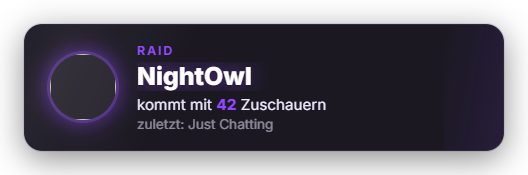
New since 1.0.20: When another channel raids you, Zappify shows its own big card in the overlay with the raider's profile picture, name, the number of viewers they brought and the game they last streamed. Minimum viewer count, display duration, profile picture and game can be configured. The look comes from presets (default: Twitch purple), can follow the global design, or can be built with an AI design (Premium). In stage direction, the raid is the most important moment: it is never shrunk and other alerts wait. The automatic shoutout on raids stays under "Other settings".
Trigger Automatically on an incoming Twitch raid; in the tab via "Test raid alert".
Requirements
- Twitch connection active.
- Free; the AI design requires Premium.
Step by step
- In the Control Panel, open the "Raid alert" tab under Alerts and turn the module on.
- Set the minimum viewer count, display duration and whether to show the profile picture and game.
- Choose an appearance preset or create your own design.
- Assign a sound to the "Raid" event in the Sound tab.
- Use "Test raid alert" (name and viewer count are freely selectable) to check how the card looks in the overlay.
If it doesn't work
- No card appears on a raid: if the viewer count is below the configured minimum, the raid is not shown. Twitch also has to be connected.
- YouTube has no raids – this alert is Twitch only.
- The game is missing: if the raider has not set a game or "Show game" is off, the line stays empty.
Last updated: 29 October 2026
Was this helpful?