Follow alerts
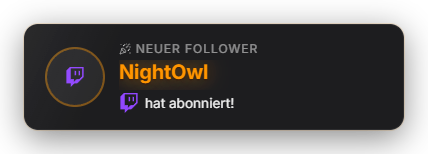
Plays an alert animation with the follower's name on every new follow. Text, sound and duration are configurable. YouTube provides no real-time subscription events — this alert is Twitch-focused. Optionally, an automatic chat greeting welcomes the new follower, and round total-follower milestones (fetched live from Twitch) trigger a special animation of their own. Since 1.0.15 the follow alert has its own tab under "Alerts" (previously in "Other settings") with a "Trigger test follow" button: the test runs through overlay, sound and automation like a real follow without changing points or statistics. The follower milestone now counts crossing the round number, so it is no longer missed when two follows arrive quickly. "Follow-bot protection" (on by default, from 15 follows per minute) pauses the popup and chat greeting until things calm down. The position can be set freely in the Positions tab. Since 1.0.24: during a follow-bot wave the follow sound stays silent too. Anyone who unfollows and follows again triggers no second alert, sound or greeting in the same stream (can be turned off under “Follow-bot protection”); goals and Hype Train don’t count them twice. New in 1.0.28: The chat greeting combines several follows ("A, B and C") and keeps at least 8 seconds apart, follow waves report start and end as a private notice, milestones only count on their own platform and the display duration is capped at 30 seconds.
Trigger Automatic on a new follow (Twitch EventSub).
Requirements
- Twitch connection active.
- Supported media formats: video/animation (WEBM, GIF, PNG), audio (MP3, WAV, OGG).
Step by step
- Configure appearance and display duration in the Follow tab.
- Drag & drop custom alert sounds or WebM videos into the media area.
- Customize text placeholders: `{username}` for login name, `{display_name}` for display name.
- Capture the overlay window in OBS as a Window Capture (one-time, see "Setting up OBS") — the alert appears in it automatically.
- Optionally enable the automatic chat greeting and the special animation for round follower counts in the Follow tab.
If it doesn't work
- YouTube subscriptions: YouTube API offers no real-time subscribe events. A polling workaround is planned for a future update; currently this module is Twitch-focused.
- No alert during a follow wave: that is the follow-bot protection (from 15 follows per minute). The follow sound from the sound tab still plays. The protection can be turned off in the Follow tab.
Last updated: 15 November 2026