Giveaway
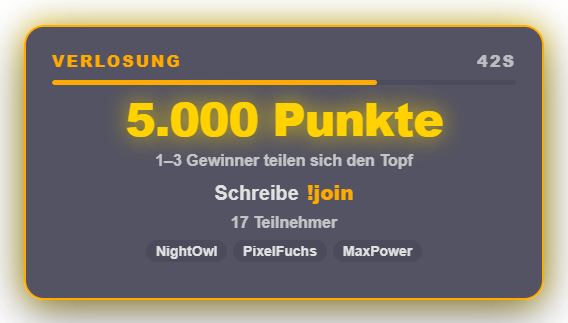
The giveaway lets you raffle points among your viewers. You set a points prize and an entry time, and viewers join with `!join`. Meanwhile the overlay shows a card with the pot, countdown, number of participants and the most recent entrants. When time is up — or via "Draw now" — the wheel spins in the familiar raffle wheel look with the participants' profile picture or Wolpertinger and draws the winners; the pot is split evenly as points, and a result card shows all winners with their share. In the free version a first wheel randomly decides on 1–3 winners, then the wheel spins once per winner. Premium adds the modes "1 winner", "Random from–to" and "Fixed number", plus an optional stake per `!join` (goes into the pot and is refunded on cancel) and a minimum level or minimum points balance to take part. Everyone can win only once; you yourself and freely configurable accounts (e.g. bots) are excluded. Start and winners are announced in chat (can be turned off). Appearance: dedicated wheel presets and Premium AI design, or "Use raffle wheel look". Freely positionable in the Positions tab; automation actions for start, draw now and cancel. New in 1.0.15: instead of points you can raffle any prize (e.g. "Steam key") – overlay, chat announcement and result show the text; you hand over the prize yourself. Anyone not allowed to join gets a short reason in chat once (not enough points, level, not a follower …). Premium: giveaways for followers only or subscribers only, plus multiple tickets for subscribers (e.g. triple chance to win). The giveaway can also be started from Stream Deck and the phone remote. New in 1.0.28: Cancelling while the wheel is spinning frees the stage immediately; "Followers only" rejects with a retry hint on a Twitch error instead of letting viewers through (the check applies to Twitch only). Stream Deck and phone key "Cancel giveaway" with confirmation.
Trigger Started in the "Giveaway" tab (Games), via the Quick Control tile, the phone remote or an automation rule; viewers take part with the chat command !join.
Step by step
- Switch the module on in the "Giveaway" tab.
- Set the points prize and entry time, and add excluded accounts if needed.
- Start the giveaway — viewers join with !join.
- Wait for the timer or click "Draw now"; the wheel draws the winners and the points are credited automatically.
If it doesn't work
- !join does not respond: check in the command overview whether the command is active and which permission level applies.
- A viewer cannot join: with Premium, a minimum level, minimum points balance or a stake may be set that the viewer does not meet.
- Giveaway cancelled: stakes already paid are refunded automatically.
- Zappify crashed during a giveaway: after the restart choose “Resume” (entrants and pot come back) or “Refund entries”. Without an answer the entries are refunded automatically after 15 minutes.
Last updated: 15 November 2026