Chat Pointer
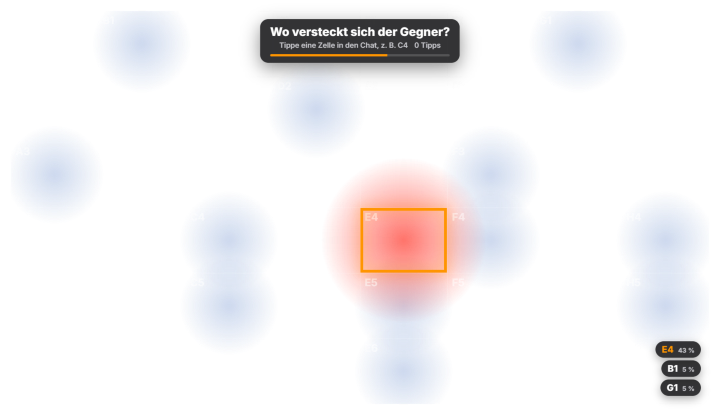
Chat Pointer lets your chat point at spots in your game – perfect for puzzle and horror games (“Where is the exit?”). At the push of a button a grid appears over the picture (default 8 × 6 with columns A–H and rows 1–6, adjustable up to 12 × 10). Viewers simply type a cell like “c4” in chat (also “4c” or “C 4”; only messages that consist of nothing but the cell count). A soft heatmap shows live where chat is pointing, the strongest cell pulses and the top 3 appear in the bottom right. Every viewer has one vote and can change it. The round ends with the timer (default 30 seconds) or when you evaluate early; the winning cell is then highlighted and announced in chat (“Chat points at C4 – 42 %”). Optionally you ask a question that appears above the grid with a countdown bar and in the start announcement. Set the grid area and size in the Positions tab to match your game. Look: 3 dedicated presets (Thermal, Night vision, Subtle), the global design and fine-tuning for gradient, grid and opacity. New in 1.0.28: Ties are shown in the overlay and in chat, leading `/ . !` in the question are neutralised, and there are triggers for start and "no votes".
Trigger “Start round” in the tab or in Quick Control; via Stream Deck / phone remote (start, evaluate) or through automation (with question and duration).
Requirements
- Premium – or the free 14-day Premium trial (see “Premium trial”).
- Twitch and/or YouTube connected.
Step by step
- Switch the module on in the “Chat Pointer” tab (Games).
- Place the grid area over your game in the Positions tab.
- Optionally enter a question and adjust the duration.
- “Start round” – chat types cells like “c4” and the heatmap fills live.
- Wait for the timer or press “Evaluate now”; “Hide” removes the result.
If it doesn't work
- Votes do not count: the message must consist of the cell only (e.g. “c4”), and the cell must exist in the grid.
- Grid is not over the game: adjust area and size in the Positions tab.
- “Part of Premium”: without a subscription or after the Premium trial has ended, the module is locked – see “Premium trial”.
Last updated: 15 November 2026