Draw & Guess
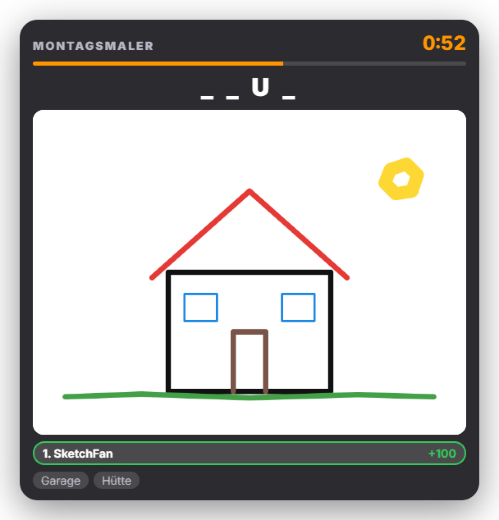
In Draw & Guess you get a secret word and draw it live while chat guesses. Drawing works best on a phone or tablet: the phone remote has a dedicated “Draw” view for it. Alternatively you draw right in the tab with the mouse. Every stroke shows up in the overlay instantly. “New round” offers you three words only you can see – your pick starts the round. Over time single letters are revealed (at 40, 60 and 80 % of the time, at most 40 % of the word; can be switched off), in the overlay and as a hint in chat. The first three correct guessers earn points (default 100 / 60 / 30). The round ends after three hits or when the timer runs out (default 90 seconds), then the word is revealed. Upper/lower case and umlauts do not matter, long words also accept one typo, and near misses show “close” in the overlay. Correct answers can be deleted from chat automatically so nobody copies them; wrong guesses run as a ticker in the overlay (the bad-word filter applies). Tools: 8 colors, 3 brush sizes, eraser, fill bucket, undo and clear all. A word list in German and English with three difficulty levels is included, and you can add your own words. Look: 3 dedicated presets (Sketchbook, Chalkboard, Party), the global design or an AI design (Premium). The drawing stays inside your home network between phone and PC. New in 1.0.28: Cancelling is announced in chat, links in the guess ticker are filtered out, the word language can be chosen, rejected custom words are shown, and optionally all placements (not just the winner) go into the leaderboard.
Trigger “New round” in the tab, in Quick Control or on the phone; via Stream Deck / phone remote (“Start Draw & Guess” with a random word, “Cancel”) or through automation.
Requirements
- Premium – or the free 14-day Premium trial (see “Premium trial”).
- Twitch and/or YouTube connected so chat can guess.
- To draw on the phone: a paired phone remote on the same Wi-Fi.
- To delete correct answers automatically: moderator rights in chat.
Step by step
- Switch the module on in the “Draw & Guess” tab (Games).
- Optionally pair the phone remote and tap “Draw” at the bottom.
- Optionally add your own words (one per line) and save them.
- Press “New round” and pick one of the three words – the round starts.
- Draw: chat guesses, letters are revealed step by step, and after three hits or when time runs out the word is revealed.
If it doesn't work
- “No words available”: add custom words or enable the built-in list in the settings.
- The “Draw” view is missing on the phone: the module must be switched on and the device needs the “Actions” permission.
- Correct answers are not deleted: Zappify needs moderator rights in chat (reconnect Twitch if necessary).
- “Part of Premium”: without a subscription or after the Premium trial has ended, the module is locked – see “Premium trial”.
Last updated: 15 November 2026