No-Laugh Challenge
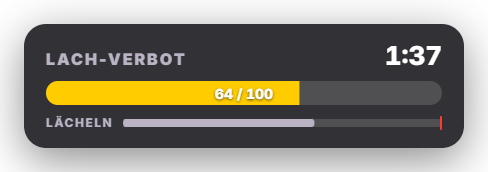
No-Laugh Challenge turns your stream into a “try not to laugh” challenge. While chat fires memes, TTS and sounds, Zappify watches your facecam source from OBS with local face detection (no second camera access). Smiling drains HP steadily, a real laugh (smile with open mouth) much more; a short twitch does not count. At the start of a round a short calibration (“look neutral”) measures your baseline. Sensitivity, HP, round duration and damage are adjustable. When your HP reaches 0, a random penalty from your list is drawn and shown large in the overlay – optionally a wheel spins as well. If you make it to the end, “Survived!” appears. The overlay shows an HP bar, time left and a live smile meter; look via 3 dedicated presets, the global design or an AI design (Premium). A free 10-second test shows the live values in the tab so you can tune the sensitivity. Chat announcements for start, penalty and “survived” can be switched off or customized. Privacy: only the chosen source is analysed, images stay in memory, are never stored and never leave your computer. New in 1.0.17: No-Laugh Challenge and Face stickers share one facecam source – choosing it in one tab applies to both. The readiness check in the dashboard checks the source too. Since 1.0.24: if you lose while the random wheel is already spinning, the penalty spin is queued instead of lost (max. 10 waiting). If the random wheel is off, the tab shows “Penalty wheel off”.
Trigger “Start round” in the tab or in Quick Control; via Stream Deck / phone remote or through automation (start/stop actions; triggers for start, laugh detected, HP lost, laughed and survived).
Requirements
- Premium – or the free 14-day Premium trial (see “Premium trial”).
- OBS with a connected WebSocket and your camera as a source in the scene.
- Good, even lighting on your face for reliable detection.
Step by step
- Switch the module on in the “No-Laugh Challenge” tab (Games).
- Choose your camera source under “Facecam source in OBS”.
- Press “Test (10 s)” and watch the live values; adjust the sensitivity in the settings if needed.
- Add your own penalties under “Penalties” (e.g. “10 push-ups”).
- “Start round”, look neutral for a moment (calibration) – then it is chat’s turn.
If it doesn't work
- “Source returns no image”: check the source name and that it is visible in OBS.
- “No face in frame”: improve lighting, face the camera, do not sit too far away.
- Too sensitive or not sensitive enough: adjust the sensitivity and really look neutral during calibration.
- Guests in frame are detected too: choose a source that shows only your face.
- When first switched on, Zappify downloads face detection once (about 6.5 MB). Without internet it does not start – Zappify tries again on the next start.
Last updated: 7 November 2026