Regulars radar
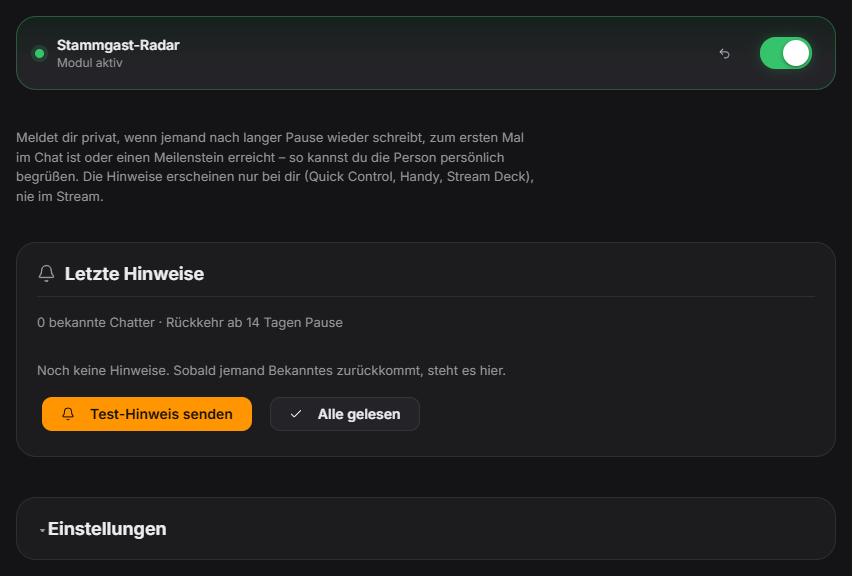
The Regulars radar helps you greet your community personally. When someone chats again after a long break (default 14 days), for the very first time, or reaches a milestone – e.g. their 50th stream, 1000th message or level 25 – you get a private notice. It appears as a pop-up in the control panel and Quick Control, in the Quick Control list “Notices for you”, as a push with vibration on the phone remote and as a counter on the Stream Deck key “Notices read”. None of this is visible on stream or in chat. Only data that already lives locally in your viewer database is used; stream attendance is counted from version 1.0.17 on. Free module.
Trigger Automatically on a viewer’s first chat message when a condition (return, first visit, milestone) is met. There is also the automation action “Notice just for me”.
Requirements
- Twitch and/or YouTube connected.
- For level milestones: the Level-up module is active.
Step by step
- Open Chat → Regulars radar and switch the module on.
- Under “Returners & first-timers”, set after how many days of absence a notice appears and whether first-time chatters are reported.
- Under “Milestones”, adjust the steps for streams (default 5/10/25/50/100/250), messages (100/500/1000/5000/10000) and levels (5/10/25/50/75/100) or switch them off individually.
- Under “Exceptions”, exclude known bots (on by default) and add your own names (e.g. alt accounts).
- Use “Send test notice” to check where the notice reaches you.
If it doesn't work
- No notice: returns and milestones are only detected from the second encounter – viewers never recorded before 1.0.17 start counting streams from now on.
- Too many notices: increase the absence for returners or turn off first-time chatters.
- A bot is reported: add its name under “Exceptions”.
Last updated: 24 October 2026