Word filter (bad-word filter)
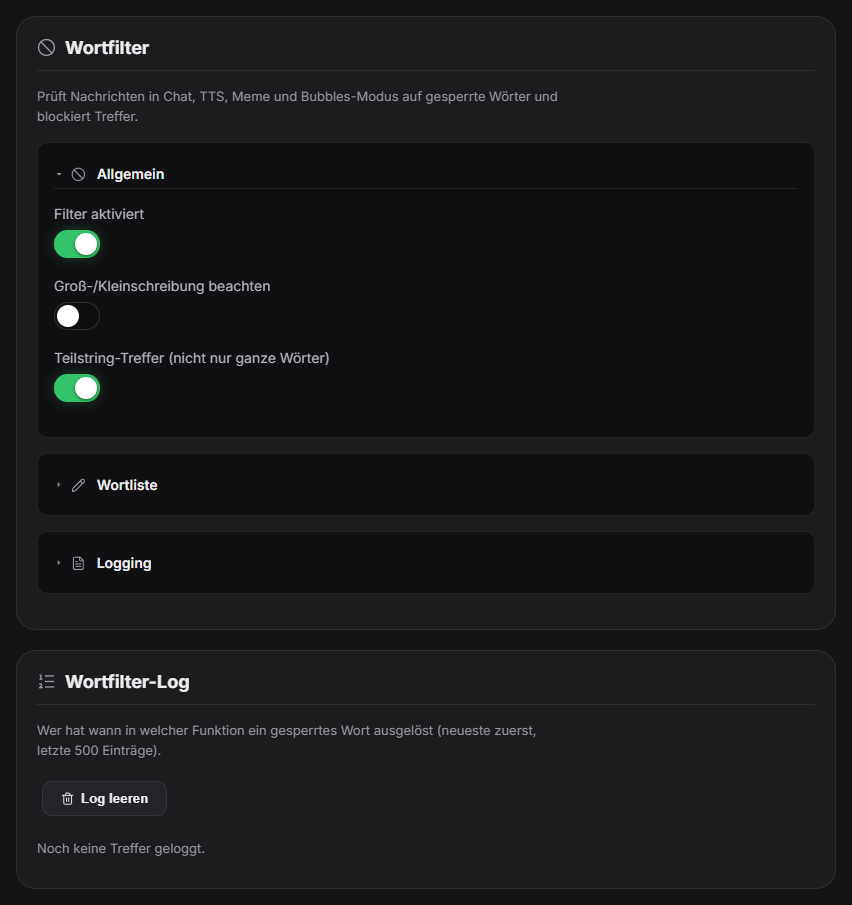
The word filter checks messages in the chat overlay, TTS, memes and the bubbles mode for banned words and blocks hits. In the “Word filter” tab under Chat you maintain the word list (a default list is pre-filled), switch the filter on or off and decide whether case matters and whether partial matches count or only whole words. In “whole words only” mode words with an umlaut at the start or end also match (e.g. “Ärger”, “Spaß”). The word-filter log below shows who triggered a banned word, when and in which feature (newest first, last 500 entries) and can be cleared. In Quick Control, hits are marked in the live chat.
Trigger “Word filter” tab under Chat in the Control Panel.
Requirements
- Free.
Step by step
- Open the “Word filter” tab under Chat.
- Switch the filter on and extend or shorten the word list.
- Choose whether case is respected and whether partial matches are allowed.
- Save – the filter applies immediately to new messages.
- Check the word-filter log to see who triggered what; “Clear log” if needed.
If it doesn't work
- Too many false alarms (a word hides inside a harmless word): turn off “partial match” so only whole words count.
- A word is not detected: check its spelling in the list and whether case is respected.
- The log is empty: it only fills once a hit was triggered and logging is on.
Last updated: 7 November 2026
Was this helpful?